
Python dictionary setdefault function is one of the Dictionary methods used to print the value at a given key position. If there is no value at the given index, it prints None. Here, we discuss the use of this and the syntax of this dictionary setdefault function is:
dictionary_name.setdefault(key, None) - None is default and optional
Parameters:
- Key: We must provide the key to be searched in the dictionary.
- Default_value: It is an optional argument. If the user-given key is not present in the original dictionary, the setdefault() function adds a new item with this key and a default value.
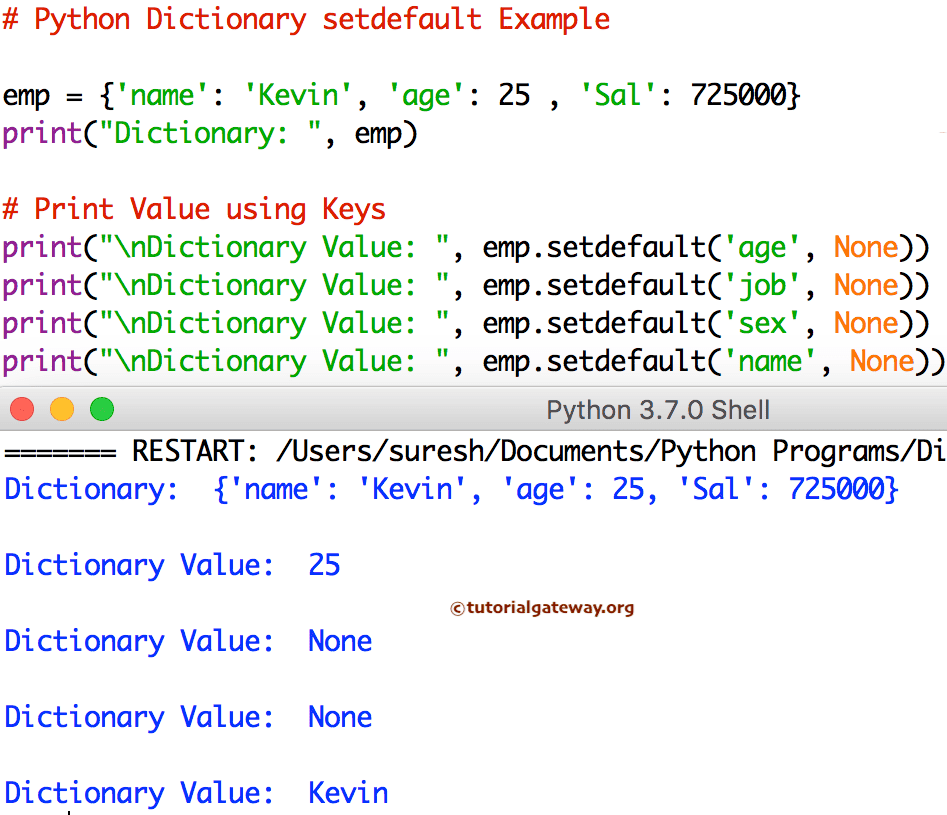
Python Dictionary setdefault Example
It prints the value at a given key (if present). If the key is not present, it inserts a new value. Please refer to the Dictionaries in Python article from our Learn Python Programming page to understand everything about them.
emp = {'name': 'Kevin', 'age': 25 , 'Sal': 725000}
print("Dictionary: ", emp)

# Print Value using Keys
print("\nDictionary Value: ", emp.setdefault('age', None))
print("\nDictionary Value: ", emp.setdefault('job', None))
print("\nDictionary Value: ", emp.setdefault('sex', None))
print("\nDictionary Value: ", emp.setdefault('name', None))
How to group a list of objects into a dictionary using Python setdefault?
In the following example, we declared a list of employee dictionaries where each dictionary contains the employee’s name and their department. Here, our task is to organize or group this list of objects into a dictionary.
Here, the Python for loop iterates over the Python list of objects. On each iteration, we used the built-in setdefault() function to group employees based on their department. To update all dictionary values, use the Python dictionary update function.
employees = [
    {"name": "John", "department": "Developer"},
    {"name": "Smith", "department": "HR"},
    {"name": "Jane", "department": "Developer"},
    {"name": "Bob", "department": "IT"},
    {"name": "Ryan", "department": "HR"},
    {"name": "David", "department": "IT"},
]

department_group = {}

for emp in employees:
    dept = emp["department"]
    department_group.setdefault(dept, []).append(emp)

print(department_group)
{
'Developer':
[{'name': 'John', 'department': 'Developer'},
{'name': 'Jane', 'department': 'Developer'}],
 'HR':
[{'name': 'Smith', 'department': 'HR'},
{'name': 'Ryan', 'department': 'HR'}],
 'IT':
[{'name': 'Bob', 'department': 'IT'},
{'name': 'David', 'department': 'IT'}]
}
Difference between Python dict.setdefault and get() method
Both the setdefault() function and the get() method return the corresponding value of the user-specified dictionary key. However, if the given key is missing, both differ.
- setdefault() returns the value of the given key. If the key is not present, it inserts a new key into the dictionary with a given default value. It means if the key is not present, it modifies the original dictionary.
- Python dictionary get() returns the value of the given key. If the key is not present, it returns a given default value. If you want the key-value pair, use the Python dictionary items function from the list of available Python dictionary methods.
NOTE: Use the get() function to read data from an existing dictionary. To assign values to missing keys, prefer the setdefault() function.
As there is no specific difference between setdefault() and get() functions when the dictionary key is present, we use the examples of missing keys. Please refer to the Python dictionary keys and Python dictionary values functions.
Using Python dictionary setdefault()
In the following example, we used setdefault() to get the information of the employee’s city (key). As there is no city key inside the dictionary, it inserts a new key-value pair where the city is the key and London (the second argument) is the value.
data = {"name": "John", "age": 25}

age = data.setdefault("city", "London")
print(age)
print(data)
London
{'name': 'John', 'age': 25, 'city': 'London'}
Using dict.get()
Here, we used the same example with a dict.get() function to extract the city name. It displays the default Unknown value as the output, but it does not change the original dictionary.
data = {"name": "John", "age": 25}

age = data.get("city", "Unknown")
print(age)
print(data)
Unknown
{'name': 'John', 'age': 25}
Python setdefault nested dictionary
In the following example, we used the setdefault() function to assign information to a nested dictionary. Here, first, we must set the first level (If any, second level). Next, we must set the key-value pairs at that level.
data = {}

user = data.setdefault("user", {})
user.setdefault("name", "Tracy")
user.setdefault("age", 27)
user.setdefault("city", "London")
print(data)
{'user': {'name': 'Tracy', 'age': 27, 'city': 'London'}}