
Python fromkeys function is used to create a new dictionary using user given key sequence and value. If you want to copy only the dictionary keys, we can use the fromkeys() function. In this section, we discuss how to use this fromkeys function with practical examples.
The syntax of this Python Dictionary fromkeys function is:
dictionary_name.fromkeys(sequence, values)
By default, Values (second argument) = None. But, you can define it as per your requirement.
To copy the dictionary keys and set their values to none, use fromkeys() with the original dictionary as the only argument. However, if we want to set the default value for each key, we use the second argument.
Python Dictionary fromkeys Example
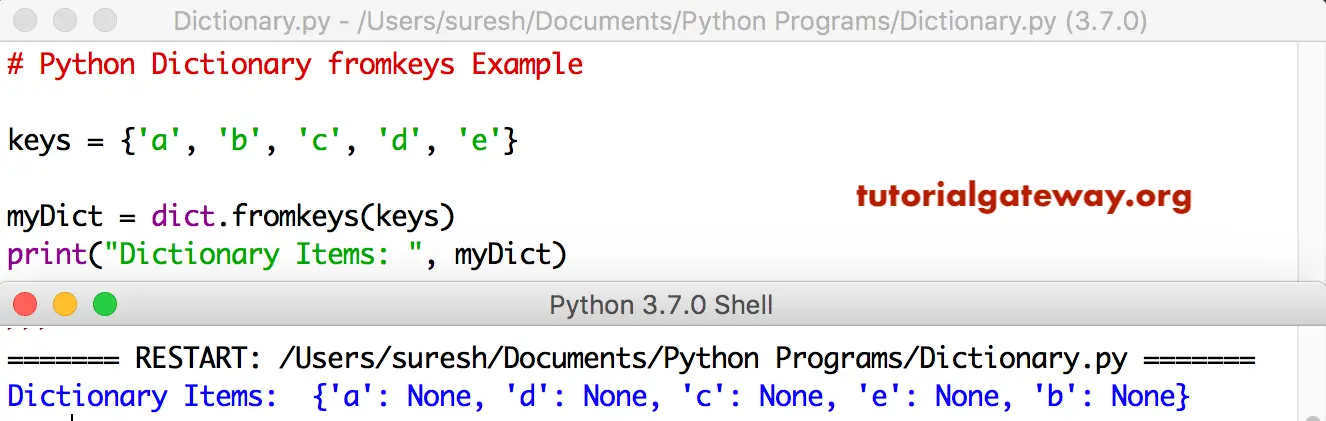
The fromkeys function creates a new dictionary using the user-given sequences and values. In this program, we are creating a dict using a few keys.
TIP: Please refer to the Python Dictionary article from our Python tutorial page to understand everything about them.
keys = {'a', 'b', 'c', 'd', 'e'}

myDict = dict.fromkeys(keys)
print("Dictionary Items: ", myDict)
As you can see, all the values returned as None.
In this program, we are using the second argument to assign a default value to the given sequence.
keys = {'a', 'b', 'c', 'd', 'e'}
values = 100

myDict = dict.fromkeys(keys, values)
print(myDict)
You can see from the output below that it is displaying 100 for all the keys. To access the value of a given key, use the Python dictionary get function from the list of available Python dictionary methods.
{'c': 100, 'b': 100, 'd': 100, 'a': 100, 'e': 100}Python dictionary fromkeys vs dict comprehension
We can use either the dictionary fromkeys() function or dict comprehension to create a dictionary from keys with or without values. However, they differ in functionality.
- The fromkeys() function creates a dictionary from another dictionary’s keys with none or a default (same value) for all the keys. It si safer to use the fromkeys() function if we want to keep the same value for all dictionary keys. We can use this method on immutable objects such as integers, floats, strings, etc.
- Dictionary comprehension provides more flexibility by allowing the use of different values for each key. It is safer to use the dict comprehension for mutable objects as values. For instance, lists, sets, or dictionaries as values means using dict comprehension.
Using Python dictionary fromkeys
In the example below, we declared a list of keys and then used the fromkeys() function to create a dictionary using the keys, setting the values to None. In the next line, we create a dictionary by setting a default value of 10.
x = ['a', 'b', 'c', 'd', 'e']
y = dict.fromkeys(x)
print(y)
z = dict.fromkeys(x, 10)
print(z)
{'a': None, 'b': None, 'c': None, 'd': None, 'e': None}
{'a': 10, 'b': 10, 'c': 10, 'd': 10, 'e': 10}
Using dictionary comprehension
In the following example, we use a dict comprehension to iterate over a list of keys (country names). On each iteration, we set the dictionary value to the length of its corresponding key. For instance, key =INDIA and its length is 5, so set its value to 5.
a = ['USA', 'UK', 'INDIA']

b = {i: len(i) for i in a}
print(b)
{'USA': 3, 'UK': 2, 'INDIA': 5}How to prevent Python dict.fromkeys from updating all keys?
By default, the built-in fromkeys() function assigns the same value for all keys in a newly created dictionary. So, the keys may be different, but the values are the same (only one default value for all keys). Use the built-in Python dictionary update functionto modify the dictionary items.
When we use mutable objects like lists, dictionaries, or sets, all keys share the same values in terms of memory address. If we modify one key-value pair, it updates all key-value pairs because of the shared memory address. Please refer to the Python dict.keys and Python dict.values functions.
The last lines show whether the memory addresses of all three countries are the same. You can use either of the two statements to check.
a = ['USA', 'UK', 'INDIA']
b = dict.fromkeys(a, [])

b["UK"].append(10)
print(b)

print(id(b['USA']) == id(b['UK']))
print(b["USA"] is b["INDIA"])

{'USA': [10], 'UK': [10], 'INDIA': [10]}
True
True
Fixing the Python dictionary fromkeys, updating all keys
To fix the updating all keys problem, we must use the dictionary comprehension approach. If we follow this approach, we can update any dictionary key-value pair independently without affecting the other values.
a = ['USA', 'UK', 'INDIA']
b = {key: [] for key in a}

b["UK"].append(10)
print(b)

print(id(b['USA']) == id(b['UK']))
print(b["USA"] is b["INDIA"])
{'USA': [], 'UK': [10], 'INDIA': []}
False
False