
The isalpha() in C Programming is useful for checking whether a given character is an uppercase (A to Z) or lowercase (a to z) alphabet.
C isalpha() syntax
The syntax of the isalpha() function is
int isalpha(int char)
Parameter: It accepts a single character as the parameter and checks whether it is an alphabet or not.
Return Value: It returns an integer value.
- If a given character is an alphabet (lowercase or uppercase letter), isalpha() returns non-zero as the output.
- If the parameter is not an alphabet, it returns 0.
TIP: To use the isalpha() function, include the <ctype.h> header file. Refer to the C tutorial page.
How isalpha() in C Programming work?
The isalpha() function checks whether a given character is an uppercase or lowercase alphabet. Traditionally, it checks whether the ASCII value of a given character is within the range.
- Uppercase A to Z: Codes between 65 and 90.
- Lowercase a to z: Codes between 97 and 122.
isalpha in C Programming Example
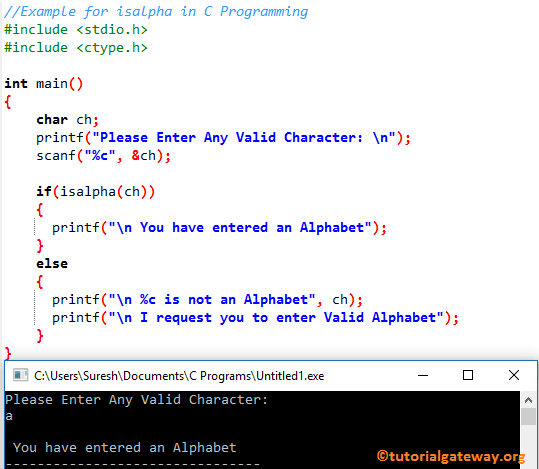
The isalpha method is useful for finding whether the given character is an alphabet or not. This program allows the user to enter any character. Next, it checks whether the given one is between A to Z or a to z using the isalpha function.
First, we declared a character variable called ch. The following C Programming printf statement will ask the user to enter. And then, we use scanf to assign the user-entered character to the ch variable.
In this next line, we added an if statement to check whether the character is between ‘A’ and ‘Z’ using the C isalpha function. If the condition is True, the printf statement inside the if block will print.
If the above if condition in C is FALSE, then the given character is not an alphabet. So, it will print the else block statements.
#include <stdio.h>
#include <ctype.h>

int main()
{
    char ch;
    printf("Please Enter Any Valid Character: \n");
    scanf("%c", &ch);

    if(isalpha(ch))
    {
      printf("\n You have entered an Alphabet");
    }
    else
    {
      printf("\n %c is not an Alphabet", ch);
      printf("\n I request you to enter Valid Alphabet");
    }
}
Checking Uppercase Letters
Let me enter the Uppercase letter. Please refer to the C islower() and C isupper() functions.
Please Enter Any Valid Character:
H

 You have entered an Alphabet
Checking Numeric Values
The above isalpha code will definitely check whether the given character is an alphabet or not, but what if we enter a numeric value? Please refer to the C Program to check whether Alphabet or not. It helps to check whether the char is an alphabet without using the isalpha function.
Please Enter Any Valid Character:
9

 9 is not an Alphabet
 I request you to enter Valid Alphabet
Special Characters Example
#include <stdio.h>
#include <ctype.h>
int main() {

    char ch = '#';

    printf("%d", isalpha(ch));
    return 0;
}
0isalpha() won’t allow negative values
The isalpha() function won’t allow negative values as a parameter. For instance, the following two variables won’t work because -1 is a negative number and 255 means 255 -256 = -1).
char ch = -1;
char ch = 255;
Always cast the parameter as mentioned below.
isalpha((unsigned char)ch)Real-time examples of isalpha() in C Programming
Using isalpha() on a string to filter non-alphabets
By default, we cannot directly use the isalpha() function on a string. For instance, the code below won’t work.
char ch = "Hi";
isalpha(ch);
To use it on a string, we must use a C for loop or a C while loop to extract individual characters.
Here, the while loop iterates over the string. On each iteration, the isalpha() checks whether the character at that index position is an alphabet.
#include <stdio.h>
#include <ctype.h>
int main() {
    char str[] = "!!Happy@#$Coding!!";
    int i = 0;

    while (str[i]) {
        if (isalpha((unsigned char)str[i])) {
            putchar(str[i]);
        }
        i++;
    }
    return 0;
}
HappyCodingSanitizing user input
#include <stdio.h>
#include <ctype.h>
#include <stddef.h>

void onlyLetters(const char *str, char *let, size_t letSize)
{
  size_t j = 0;
  for (size_t i = 0; str[i] != '\0' && j < letSize - 1; i++)
  {
    if (isalpha((unsigned char)str[i]))
    {
      let[j++] = str[i];
    }
  }
  let[j] = '\0';
}

int main(void)
{
  const char input[] = "New@20.25!Model##9000";
  char output[100];

  onlyLetters(input, output, sizeof(output));
  printf("Letters Only: %s\n", output);
  return 0;
}
Letters Only: NewModelDifference between isalpha() and isalnum()
- isalpha(): Checks whether the character is a letter (uppercase or lowercase alphabet).
- C isalnum(): Checks whether the character is alphanumeric. It means alphabets + digits.