
The isalnum() in C programming language is useful for checking whether a given character is either an alphabet (lowercase and uppercase letters) or a numeric (digit) value. We can use the isalnum() function for validating usernames, filtering user inputs for special characters, etc.
C isalnum() function syntax
The syntax of the isalnum in this language is as shown below.
int isalnum(int char)
Parameter: The above C isalnum() function accepts a single character of integer type as the parameter and checks whether the given character is either a number or an alphabet.
Return Value
- If the given character is an alphanumeric value, it returns a non-zero integer value.
- If it is not alphanumeric (neither an alphabet nor a digit), it returns 0 as the output.
NOTE: To use the isalnum() function, we must include the <ctype.h> header file.
How does isalnum() in C programming work internally?
The isalnum() function checks whether the given character is alphanumeric (Alphabet + Digit). ASCII values represent the characters, so it checks whether the character is in the following bracket. If it does not fit in this range, isalnum() returns 0 as the output.
- Digits (0 -9): ASCII values between 48 and 75.
- Uppercase Alphabets (A to Z): Values between 65 and 90.
- Lowercase Alphabets (a to z): Values between 97 and 122.
TIP: The isalnum() function only works with standard alphabets. If you pass non-ASCII or Unicode characters, it considers them as not alphanumeric.
C isalnum function with Alphabets, Digits, and Special Characters
The isalnum method (alphanumeric) is used to determine if a given character is either an alphabet or a number. This C program allows the user to enter any character. Next, it checks whether the character is between A to Z, or a to z, or a numeric value using the isalnum() function. Check the C tutorial page.
#include <stdio.h>
#include <ctype.h>

int main()
{
    char ch;
    printf("Please Enter Either an Alphabet, or a Number: \n");
    scanf("%c", &ch);

    if(isalnum(ch))
    {
      printf("\n You have entered an Alphanumeric Character");
    }
    else
    {
      printf("\n %c is not an Alphanumeric Character", ch);
      printf("\n I request you to enter Valid Number, or an Alphabet");
    }
}
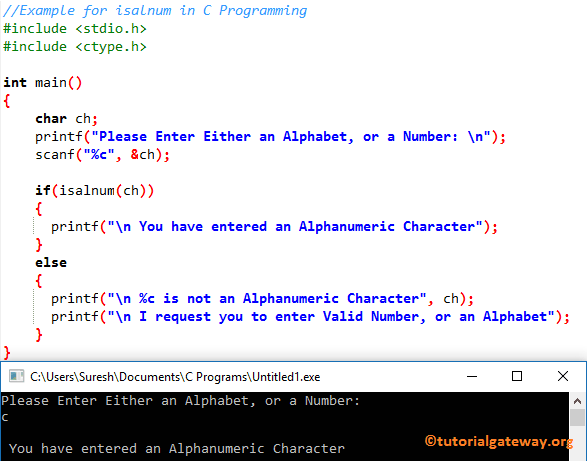
Checking Uppercase alphabets
Let me enter the Uppercase letter.
Please Enter Either an Alphabet, or a Number:
K

 You have entered an Alphanumeric Character
Checking Digits or Numbers
Let me enter the Numeric value.
Please Enter Either an Alphabet, or a Number:
9

 You have entered an Alphanumeric Character
In this isalnum in C program, we first declared a character variable called ch. The following C Programming statement will ask the user to enter any character. Then we use the scanf to assign the user-entered character to the ch variable
printf("Please Enter Either an Alphabet, or a Number: \n");
scanf("%c", &ch);
In this next line, we added the If Statement to check whether the character is between ‘A’ to ‘Z’, or ‘a’ to ‘z’, or a number using the isalnum function. If the condition is True, the following statement will print. Refer to the C If Statement.
printf("\n You have entered an Alphanumeric Character");
If the above condition is FALSE, then the given character is not an Alphabet or a number. So, this C program will print the below statements.
printf("\n %c is not an Alphanumeric Character", ch);
printf("\n I request you to enter Valid Number, or an Alphabet");
Checking Special Characters
The above isalnum code perfectly checks whether the given character is either an alphabet or a number. But what if we enter the symbols or special characters?
Please Enter Either an Alphabet, or a Number:
*

 * is not an Alphanumeric Character
 I request you to enter Valid Number, or an Alphabet
Let me try with the space character.
Please Enter Either an Alphabet, or a Number:


   is not an Alphanumeric Character
 I request you to enter Valid Number, or an Alphabet
NOTE: As we all know, special characters like @, #, $, etc are not alphanumeric, so the isalnum() function returns 0 as the output.
Real-time examples of isalnum in C programming
Username Validation
In the example below, the C while loop iterates over the C string characters. The logical not and isalnum() checks whether a character is not alphanumeric. If true, return 0. Otherwise, complete the string. The fi else statement prints the message based on the result.
#include <stdio.h>
#include <ctype.h>
int usernameValidation(const char *name)
{
    while (*name)
    {
        if (!isalnum((unsigned char)*name))
        {
            return 0;
        }
        name++;
    }
    return 1;
}

int main()
{
    char username[] = "sample1234";
    if (usernameValidation(username))
    {
        printf("Valid.");
    }
    else
    {
        printf("Invalid Username");
    }

    return 0;
}
Valid.Validate a string by removing special characters
#include <stdio.h>
#include <ctype.h>
int main(void)
{
    const char str[] = "Happy@$20#$2*6!";

    for (int i = 0; str[i] != '\0'; i++)
    {
        if (isalnum((unsigned char)str[i]))
        {
            putchar(str[i]);
        }
    }
    putchar('\n');
    return 0;
}
Happy2026Can I directly use isalnum() on strings?
It accepts only a character as the parameter, so you can’t use a string directly as the isalnum() parameter.
isalnum("hi") = Does not work.
If you want, use the for loop to iterate over the string characters and apply the isalnum() function on every character. Check the for loop in C.
isalnum(str[i])
Use Negative Values as the C isalnum() parameter
The isalnum() function accepts a positive (unsigned) value as the parameter. When you pass a negative value, its behaviour is undefined.
char ch = -1 or
char ch = 150
Character above 127 becomes negative, so 150 eventually becomes (150 – 256 = -106), which is wrong.
Always cast the character to avoid undefined behaviour.
isalnum((unsigned char)ch)
Difference between isalnum(), isalpha(), and isdigit()?
| Function | Checks | Description |
|---|---|---|
| isalnum() | Alphabets + Digits | It checks whether the character is a letter (alphabet) and digit. |
| C isdigit() | Digits Only (0-9) | It checks whether the character is a digit. |
| C isalpha() | Alphabets Only(a-z and A-Z) | It checks whether the character is an alphabet. |