
The for loop in C Programming is used to repeat a block of statements a specified number of times until the specified condition evaluates to False. Although there are three types of loops: while, do while, and for loop, the for loop is one of the most used ones. Here, we can place initialization, condition, and update value in one place.
In C Programming, a for loop is a control flow statement that executes a block of code multiple times. If you know how many times the loop iterates, we can use this for loop. It uses a counter variable to decide the starting point, and the condition applied to the variable to stop the iteration.
This article covers the basic syntax, flowchart, different forms of the for loop in C, how it works in real-time, nested examples, and possible encounters with an infinite loop.
C For Loop Syntax
The standard syntax of the For Loop in this programming language is as follows:
for (initialization; test condition; increment/decrement operator)
 {
       //Statement 1
       //Statement 2
       ………
       //Statement n
 }
If you observe the syntax below, the for loop in the C language has three expressions separated by semicolons (;), and the execution of these expressions is as follows:
- Initialization: The for loop starts with the initialization statement. So, first, initializing counter variable(s) (example, counter = 1 or i = 1). The initialization section is executed only once at the beginning.
- Test Condition: The value of the counter variable is tested against the test condition. If the condition is evaluated to True, the C compiler will execute the statements inside the For loop. If the condition evaluates to false, the compiler will terminate. So, the compiler will repeat the process (executing the statements within the loop) until the condition evaluates to false.
- Increment & decrement operator: This expression is executed after the end of each iteration. This operator helps increase or decrease the counter variable as required. If you miss updating the current value, the counter variable will remain the same for n iterations (infinite loop).
- Code Block: It is nothing but the statements inside the curly braces {}. On each iteration, the C compiler executes these statements.
Flow Chart of the For Loop
The screenshot below will show you the C programming for loop flow chart, and the execution process of it is:
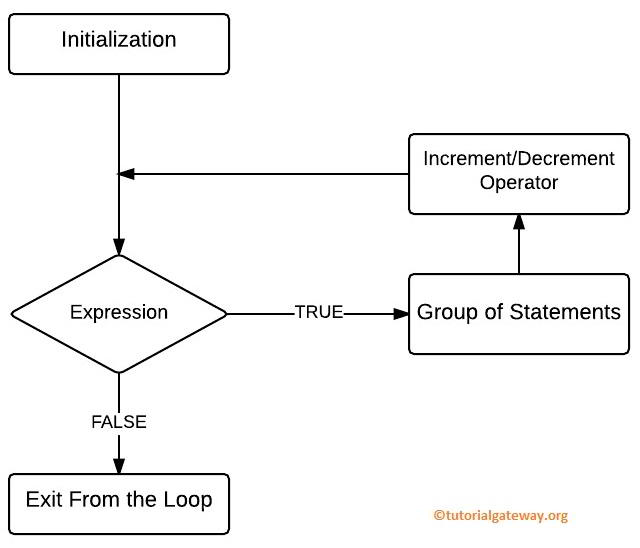
The workflow of a for loop is:
- Step 1 (Initialization): We initialize the counter variable(s). It is an entry to the for loop. Example, i=1.
- Step 2 (Expression): It will check the condition against the counter variable.
- Step 3: If the condition is True, the compiler moves to the group of statements section and executes the statements inside it.
- Step 4 (Update): After completing the iteration Step 3 (from the group of statements section), it will execute the Increment and Decrement Operators inside it to increment or decrease the value.
- Move to Step 2: Again, it will check the expression after the value is incremented. The statements inside it will execute as long as the condition is True.
- Step 5: If the condition is evaluated as False, the C Programming compiler will exit from a for loop.
NOTE: Apart from the for loop condition, we can use break and continue statements to control the execution flow. The break statement will terminate the loop. On the other hand, the continue statement will skip the current iteration.
Different forms of the for loop in C
The syntax section covers the standard way of writing a for loop, which includes the initialization, condition, and increment/decrement of the counter variable. Although these three steps are the pillars for writing a for loop statement, we can omit one or more sections from the declaration.
Although we can skip one or more sections from it, we must place a semicolon (;) in place; otherwise, it will throw a compilation error. The following examples show you the features of the for loop.
Initialize the counter variable before the C for loop statement
We start by excluding the counter variable initialization within the for loop. It is one of the common scenarios we may encounter in a real-time scenario.
The counter variable initialization can be skipped. For this, we must declare the variable before the C for loop and place an empty semicolon.
The following statement declares an i variable (acts as a counter variable) and assigns the value of 1.
int i=1;
Within the for loop statement, we left the initialization section blank but placed a semicolon.
for( ;i<=5;i++)
Example: How to Print Numbers from 1 to 5?
The following C example uses the for loop without initializing the counter variable and prints the numbers from 1 to 5.
#include <stdio.h>
int main()
{
    int i = 1;

    for (; i <= 5; i++)
    {
        printf("%d\t", i);
    }
    return 0;
}
1 2 3 4 5In the above code,
- int i = 1; – It declares a variable i holding 1. It executes only one time, and the compiler moves to the next line.
- Next, the C compiler will enter the for loop.
- Within the loop, it tests the condition whether the i value is less than or equal to 5. If true, execute the printf statement within the code block ({}).
- Once the execution of the code inside the curly braces completes, i++ will increment the i value to 2.
- Repeat steps 3 and 4 until the i value reaches 6 because the for loop condition (step 3) fails.
Update the counter value inside a C for loop code block
Similar to initialization, we can skip the increment/decrement operations inside the for loop statement. However, we must place this operation within the code block ({}); otherwise, it becomes an infinite loop.
Although we exclude the third section, we must place a semicolon after the condition. For example,
for(int i = 1; i < 5; )
{
	// Logic to repeat
   i++;
}
Example: How to print the Same Message multiple times?
The C for loop statement in this example contains the initialization and the condition. However, within the for loop, the i++ line executes on each iteration and updates the counter value with the next number.
#include <stdio.h>
int main()
{
    for (int i = 1; i <= 5;)
    {
        printf("Hello World!\n");
        i++;
    }
    return 0;
}
Hello World!
Hello World!
Hello World!
Hello World!
Hello World!
Skip the test condition
In C Programming, we can also skip the text condition of a for loop statement. However, it is not advisable, but you have the option. If you omit the text condition, we must use a loop breaker, such as the break statement, to terminate the loop with a certain condition. Otherwise, the compiler executes the same code infinitely.
Example: Using break inside the for loop in C programming
In this example, we haven’t used any test condition inside a for loop. The counter variable starts at 1, and i++ increments the i value on each iteration. On each iteration, the printf statement prints the Hi message to the console. The if statement in the next line tests whether i equals 3. If true, the break statement will terminate the loop, and the compiler will exit the for loop statement.
#include <stdio.h>
int main()
{
    for (int i = 1; ;i++)
    {
        printf("%d: Hi!\n", i);

        if(i == 3)
        {
            break;
        }
    }
    return 0;
}
1: Hi!
2: Hi!
3: Hi!
Multiple initializations
A for loop in C programming allows us to initialize more than one counter variable at a time. It helps to work with multiple loop control variables simultaneously. To achieve it, we must separate initializations by comma-separated values.
TIP: The compiler executes both counter variables at the beginning of the for loop only once.
Example: Initialize multiple counter variables in C for loop
To demonstrate the same, we used a simple example that prints the 5th table. Here, i and j are the two counter variables initialized inside the for loop. They will execute at the beginning of the loop. Next, the condition and the increment process only look for the i variable. It means the j variable is a constant that does not change.
#include <stdio.h>
int main()
{
    int i, j;
    for (i = 1, j = 5; i <= 5; i++)
    {
        printf("%d * %d = %d\n", i, j, i * j);
    }
    return 0;
}
1 * 5 = 5
2 * 5 = 10
3 * 5 = 15
4 * 5 = 20
5 * 5 = 25
C for loop with Multiple Counter Variables with increment
In the above example, we haven’t incremented or decremented the second counter variable. However, there are situations where we have to change both values on each iteration. In such a case, we can use the increment/decrement operators to increase or decrease both values.
Example: Increment and Decrement
This C example performs multiplication on two variables that are initialized within a for loop. The condition only considers the i value, and when it reaches 6, the compiler will exit from the loop. Here, the i value increments on each iteration. On the other hand, the j value decreases from 10 to 6.
#include <stdio.h>
int main()
{
    int i, j;
    for (i = 1, j = 10; i <= 5; i++, j--)
    {
        printf("%d * %d = %d\n", i, j, i * j);
    }
    return 0;
}
1 * 10 = 10
2 * 9 = 18
3 * 8 = 24
4 * 7 = 28
5 * 6 = 30
Multiple Initialization and conditions inside a C for loop
A for loop also allows using multiple conditions. In both the initialization and the increment steps, we must use the comma to separate the two counter variables. However, instead of using a comma, we have to use the logical operator to separate the two conditions. For example, the following code uses the logical OR operator to join the two conditions.
for(i = 1, j = 1; i <= 10 || j <=10; i++, j++)
Example: Multiple conditions
This example uses two conditions joined by the logical AND operator (&&). The first condition checks whether i is less than or equal to 12. The second condition checks that j is less than or equal to 7. If either of the two conditions fails, the compiler will exit from the loop.
#include <stdio.h>
int main()
{
    int i, j;
    for(i = 1, j = 1; i <= 12 && j <= 7; i+=2, j++)
    {
        printf("%d * %d = %d\n", i, j, i * j);
    }
    return 0;
}
1 * 1 = 1
3 * 2 = 6
5 * 3 = 15
7 * 4 = 28
9 * 5 = 45
11 * 6 = 66
For loop without curly braces {}
In the C programming language, we can write a for loop without curly braces {}. However, it is not advisable because of the limitations.
When there is a single statement to execute inside a for loop, we can avoid the curly braces. However, if there are multiple statements, it won’t work.
Example: Executing a single statement
In this example, we placed two printf() statements inside a for loop to print the numbers from 1 to 3 and the ” Hi message three times.
If you observe the output, it prints numbers from 1 to 3, and prints “Hi” only once. Because the compiler considers the immediate (printf(“%d “, i);) as the for loop code block. The next printf statement (printf(“\nHi”);) is another statement outside the for loop with an extra space at the beginning.
TIP: If you add curly braces, the compiler prints numbers and Hi.
#include <stdio.h>
int main()
{
    for (int i = 1; i < 4; i++)
        printf("%d  ", i);
        printf("\nHi");
    return 0;
}
1  2  3
Hi
Decrementing a for loop in C programming
In all our previous sections and examples, we used the increment operator to update the counter variable. However, we can use the decrement operator i– to traverse from the maximum to the minimum value. It is essential to traverse an array or string from the end position to the start.
Example: How to print Numbers in Reverse Order
The following example initializes the counter variable at 10. Next, use the decrement operator to subtract 1 from i (i–). So, the program below prints the natural numbers from 10 to 1 (in reverse order).
#include <stdio.h>
int main()
{
    for (int i = 10; i > 0; i--)
    {
        printf("%d  ", i);
    }
    return 0;
}
10 9 8 7 6 5 4 3 2 1 For Loop in C Programming Example
The for loop program allows the user to enter any integer values. Then it will calculate the sum of natural numbers up to the user’s entered number.
- Within this C for loop example, the User can enter any value above 1 (In this example, we are entering 20), and the total variable is initialized to 0.
- Next, we assign the user-entered value to a number variable. Then we will check whether the counter variable (i) is less than or equal to the number.
- If the condition results are true, i added them to the total. Otherwise, it will exit from it. At the start of the loop, i = 1 and n = 20; the condition will be True until i is incremented to 21.
- In the next section, we used the ++ operator to increment the i value. SO, 1 becomes 2, 3, 4,.. After the incrementing process, it will repeat until the condition resulting as False (until I =21).
// Example
#include <stdio.h>

int main()
{
  int i, number, total= 0;

  printf("\n Please Enter any integer\n");
  scanf("%d", &number);

  for(i=1; i<= number; i++)
   {
     total = total + i;
   }

  printf("\nSum of n natural numbers is: %d\n", total);
  return 0;
}
C program Output

TIP: Please refer to the Array article to understand how to use a for loop to iterate over the array items.
Nested For Loop in C Programming
Placing one for loop inside another is called a nested for loop, which helps work with complex structures. For instance, the outer (main) loop iterate the row values, and the inner (nested loop) iterates over the columns. A few common examples are traversing two-dimensional arrays and printing patterns.
The Nested for loop working approach in C Programming: If there are two for loops (1 and 2), with 2 nested inside 1.
- The compiler checks the 1st for loop condition (same as the above examples). If the condition is True, the compiler enters the 2nd loop. Otherwise, the compiler will exit from the complete loop structure.
- Once the compiler enters the 2nd loop, the process of checking the condition and increment/decrement of the counter variable happens until the condition fails. It acts independent to 1st loop.
- Once the 2nd loop condition fails, the compiler will increment the 1st loop counter value and repeat the process of the above two steps. It means for each 1st loop iteration, the nested for loop must complete all iterations and execute the statements inside it.
TIP: The second loop always depends on the 1st loop’s condition. So, we can’t enter the nested for loop directly (bypassing the 1st one).
For example, the C code below is a nested for loop example. The compiler will iterate the 1st loop from 1 to 3. Next, the nested for loop (2nd one) iterates from 1 to 10 to print the multiplication tables of 1, 2, and 3.
for (i = 1; i <= 3; i++)
{
    for (j = 1; j <= 10; j++)
    {
        // statements
        // printf("%d * %d = %d\n", i, j, i * j);
    }
}
In the following example, we will show you how to nest one inside another, also called a nested for loop in the C Programming language.
#include <stdio.h>

int main()
{
 int i, j;

 for (i=9; i<=10; i++)
  {
   for (j=1; j<=10; j++)
    {
      printf("%d * %d = %d\n",i ,j, i*j);
    }
  }
 return 0;
}

This program prints multiplication tables of 9 and 10. In the first one, i value initialized to 9, and then it checks whether i is less than or equal to 10. This condition is evaluated to True until i reach 11. If this expression result is True, it will enter the second. Otherwise, it will exit from it. Inside the 1st loop, we initialized another counter variable, j. On each 1st loop iteration, the j variable will traverse from 1 to 10.
C For Loop Iteration 1: for (i = 9; i <= 10; i++)
The condition (9 <= 10) is True. So it will enter the second.
Nested one first iteration: (j = 1; j <= 10; j++)
The expression (1 <=10) is True. So the statement inside it will be printed.
9 * 1 = 9
Next, the value of j will increment to 2
Nested Second iteration: (j = 2; 2 <= 10; 2++)
The expression (2 <=10) is True
9 * 2 = 9
It will repeat the process up to 10. Next, j’s value is 11; the expression (11 <= 10) evaluates to false. So the compiler exits from the nested or inner one. It will only exit the inner (Second) but not from the entire loop.
Iteration 2: (i = 10; 10 <= 10; 10++)
The expression (10 <= 10) is True. So it will enter the second one.
Repeat the Nested for loop iteration.
Iteration 3: (i = 11; i <= 10; i++)
i = 11, and the condition evaluated to False, so it is terminated—no need to check the second one.
Infinite loop
An infinite for loop in C Programming executes continuously indefinitely (without terminating). There are multiple reasons for an infinite loop, and the following are some of them.
- No Increment/Decrement: If we haven’t specified any expression to increment or decrement the counter variable, the value will be the same for n number of iterations. Example: for(i = 1; i < 10;). Here, the ‘i’ value is always one, and the iteration goes infinite times.
- No Condition: If you forgot the condition or used the wrong condition, it will enter into an infinite for loop. Examples are:
- for(i = 1; ; i++): Here, there is no condition to exit the loop.
- for(i = 1; i > -1; i++): From the initialization time, the i value is always true because any positive number is always greater than -1.
- Empty for loop: No initialization, condition, or increment or decrement of the counter value. Example: for(; ; ;).
To demonstrate the same, we use the following program. It does not have any expression to update the counter variable. So, the i value won’t change, and the C for loop iterate infinitely.
#include <stdio.h>
int main()
{
    int i, j;
    for(i = 1; i <= 3; )
    {
        printf("%d  ", i);

    }
    return 0;
}
NOTE: Always be careful with the conditions and update the counter variable on each iteration.