The MySQL BIT_LENGTH is one of the String Function, which returns the length of a specified string in bits. The syntax of the BIT_LENGTH Function is as shown below:
SELECT BIT_LENGTH (Character_Expression)
FROM [Source]
To demonstrate this string BIT_LENGTH, we are going to use the customer details table data that we showed below

MySQL BIT_LENGTH Example
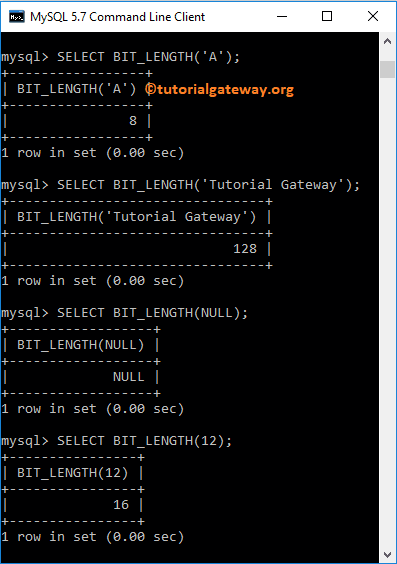
The String BIT_LENGTH returns the Bit length of a given character expression. The following query shows multiple ways to use this function by using different values.
SELECT BIT_LENGTH('A');

SELECT BIT_LENGTH('Tutorial Gateway');

-- It returns NULL as output
SELECT BIT_LENGTH(NULL);

SELECT BIT_LENGTH(12);
BIT LENGTH Example 2
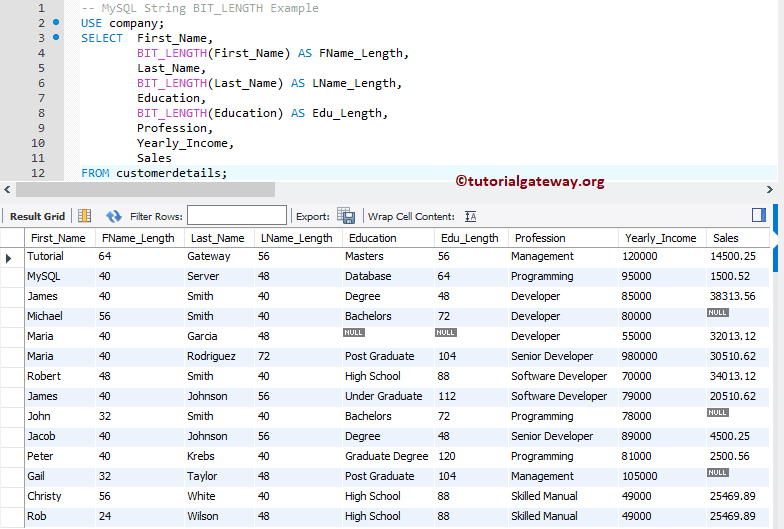
In this String method example, we are going to implement the string BIT_LENGTH function in on different columns in a customer details table. The following MySQL statement returns the Bit length of the data present in First_Name, Last_Name, and Education Columns.
USE company;
SELECT  First_Name,
		BIT_LENGTH(First_Name) AS FName_Length,
		Last_Name,
        BIT_LENGTH(Last_Name) AS LName_Length,
        Education,
        BIT_LENGTH(Education) AS Edu_Length,
        Profession,
        Yearly_Income,
        Sales
FROM customerdetails;