The JavaScript tan function is a Math function used to calculate the Trigonometry Tangent for the specified expression. The syntax of the tan Function is:
Math.tan(number);
The mathematical formula of the JavaScript Trigonometry Tangent function is the Length of the Opposite Side / Length of the Adjacent Side
tan Example
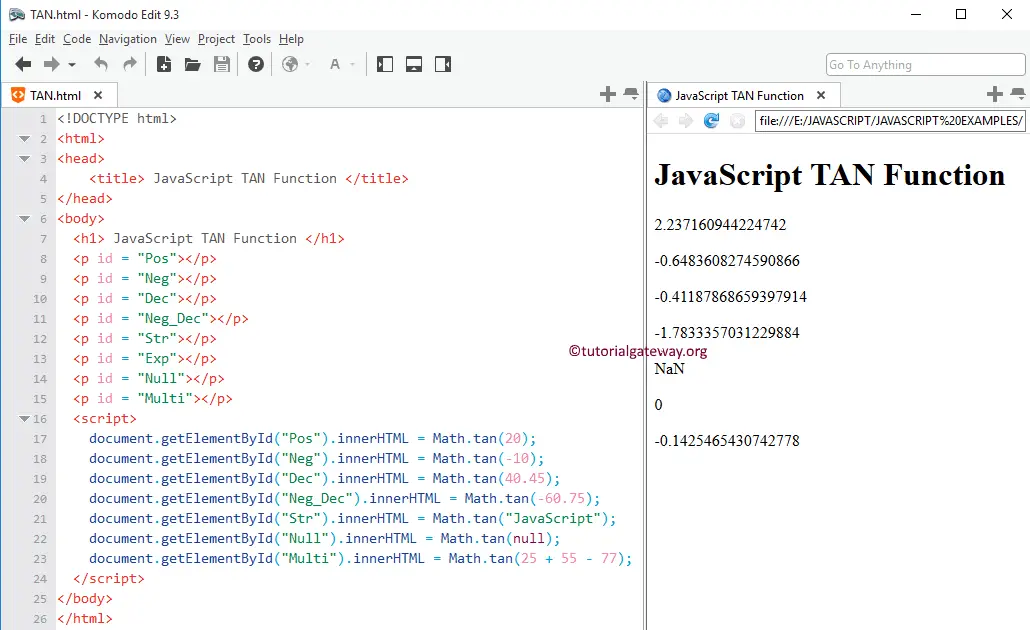
In this TAN example, we will find the tangent values of different data types and display the output.
TIP: Please refer to the ATAN Function to find the JavaScript Arc Tangent.
<!DOCTYPE html>
<html>
<head>
    <title> JavaScriptTANFunction </title>
</head>
<body>
  <h1> JavaScriptTANFunction </h1>
  <p id = "Pos"></p>
  <p id = "Neg"></p>
  <p id = "Dec"></p>
  <p id = "Neg_Dec"></p>
  <p id = "Str"></p>
  <p id = "Exp"></p>
  <p id = "Null"></p>
  <p id = "Multi"></p>
  <script>
    document.getElementById("Pos").innerHTML = Math.tan(20);
    document.getElementById("Neg").innerHTML = Math.tan(-10);
    document.getElementById("Dec").innerHTML = Math.tan(40.45);
    document.getElementById("Neg_Dec").innerHTML = Math.tan(-60.75);
    document.getElementById("Str").innerHTML = Math.tan("JavaScript");
    document.getElementById("Null").innerHTML = Math.tan(null);
    document.getElementById("Multi").innerHTML = Math.tan(25 + 55 - 77);
  </script>
</body>
</html>