The JavaScript sqrt function is a Math function used to find the square root of a specified expression or a specific number. The syntax of the sqrt Function is:
Math.sqrt(number);
- If the number argument is a positive integer, the math sqrt will return the square root of a given value.
- The Square root function will return NaN if it is negative or not a number.
- And if it is Null, it returns Zero.
JavaScript sqrt Function Example
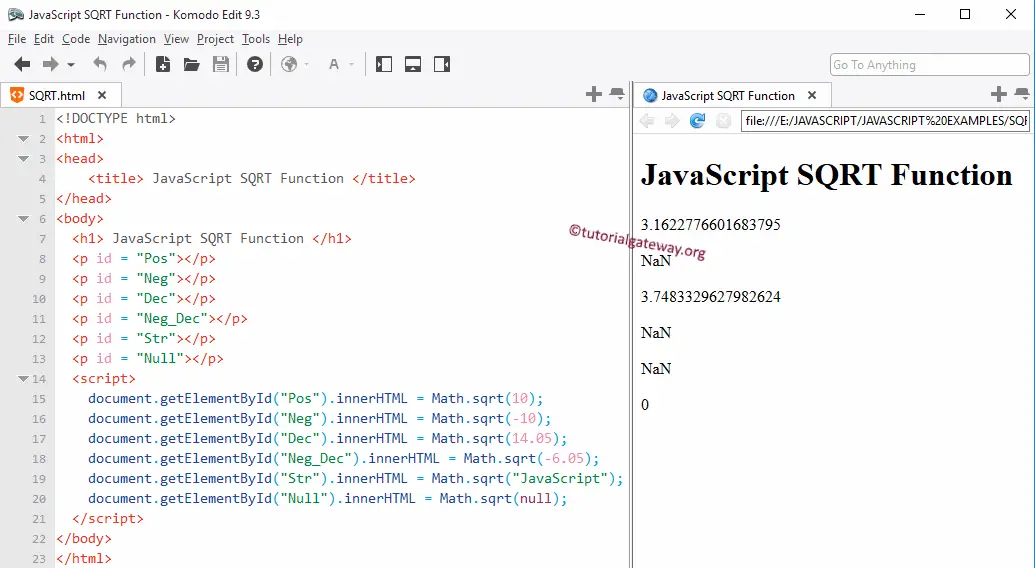
The sqrt function finds the square root of a given number. In this example, we will find the JavaScript square root of different data types and display the output.
- First two statements, We used the SQRT Function directly on the Positive and negative integers. The screenshot below shows that it returns NaN as output for a negative integer.
- Following four statements, we used the JavaScript Function on the Positive and negative Decimal values. As we said before, it is returning NaN for a negative decimal.
- Using this Function on the string value also returns NaN.
- Last, We tried the SQRT Math function on Null value, and it returns Zero as output.
<!DOCTYPE html>
<html>
<head>
    <title> JavaScriptSQRTFunction </title>
</head>
<body>
  <h1> JavaScriptSQRTFunction </h1>
  <p id = "Pos"></p>
  <p id = "Neg"></p>
  <p id = "Dec"></p>
  <p id = "Neg_Dec"></p>
  <p id = "Str"></p>
  <p id = "Null"></p>
  <script>
    document.getElementById("Pos").innerHTML = Math.sqrt(10);
    document.getElementById("Neg").innerHTML = Math.sqrt(-10);
    document.getElementById("Dec").innerHTML = Math.sqrt(14.05);
    document.getElementById("Neg_Dec").innerHTML = Math.sqrt(-6.05);
    document.getElementById("Str").innerHTML = Math.sqrt("JavaScript");
    document.getElementById("Null").innerHTML = Math.sqrt(null);
  </script>
</body>
</html>